
Industry insights
When Does Excel become a planning risk in Oil & Gas?
The problem is what you’re asking it to hold together.
Excel becomes a planning risk when the spreadsheet is no longer just an analytical interface and starts carrying responsibilities better handled by Oracle EPM Cloud: version control, security, workflow, data integration, scenario management, audit trail and cross-team consolidation. The issue is not Excel itself. It is dependency on disconnected files as the system of record for planning.
Finance teams do not need another article telling them to stop using Excel. They will not. Nor should they.
Excel remains one of the most flexible analytical tools in finance. It is familiar, quick and powerful. In Oracle EPM environments, Excel can also remain part of the user experience through Smart View.
The problem begins when Excel is asked to become something it was never designed to be: the entire planning architecture.
Excel as an interface vs Excel as the architecture – what’s the difference?
Excel as an interface or analytical tool is often valuable – investigating data, ad-hoc analysis, familiar formulas, interacting with governed enterprise data. Excel as the underlying planning architecture is different: the organisation depends on individual files to hold assumptions, calculations, versions, workflow and sometimes access control.
That approach can work for a small model with a limited number of contributors. The difficulty appears as the business adds assets, scenarios, entities and forecast cycles.
How fast does spreadsheet complexity actually scale?
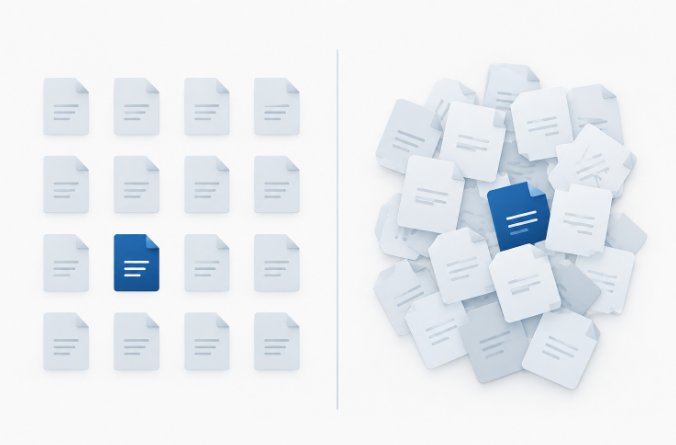
At Wood Mackenzie’s conference, the panel used a deliberately simple example: roughly 100 assets, 12 months and three or four scenarios can quickly turn into thousands of spreadsheet instances – the discussion referred to “4,000 spreadsheets” as the practical scale problem. The arithmetic is illustrative, not an industry benchmark, but the underlying point is real: assets × periods × versions × scenarios × contributors multiplies fast. At some point, finance spends more time maintaining the planning process than analysing the plan.
What are the warning signs that Excel has become the risk?
Spreadsheet risk usually becomes visible through behaviour before it becomes a formal controls issue. Look for questions such as: Which file is the latest version? Has this asset submitted yet? Did the formula change between versions? Has the production forecast been updated in finance? Who changed this assumption? Can we rerun the downside case without overwriting the base case? Why does the board pack not reconcile to the forecast workbook?
If those questions are routine, the process may have outgrown the architecture.
Featured content
What is enterprise performance management

The best way to kickstart a digital transformation
Share this post
Can Excel stay part of an Oracle EPM implementation?
Yes. The control layer just moves. Our NEO Financial Reporting case is a good example: the published solution used Oracle EPM and automated SAP S/4HANA Public Cloud integration while still providing bespoke Excel Smart View templates, automated cash-flow reporting, version control and the ability to archive versions in the application.
Keep Excel where it is strong. Move governance, workflow, versioning, integration and enterprise calculations into a controlled planning layer.
Why does oil and gas magnify this problem?
Oil and gas planning contains several characteristics that make spreadsheet dependency harder to sustain: multiple assets and operating hierarchies, production quantities alongside financial data, long time horizons, scenario and sensitivity requirements, major CAPEX programmes, portfolio changes through acquisition and divestment, decommissioning obligations, and multiple source systems and ledgers.
GKEPM’s Trident Energy customer snapshot is relevant here. Trident wanted to reduce reliance on Excel for financial consolidation and forecasting on SAP. GKEPM’s pre-implementation work focused on defining scope, validating SAP integration requirements and establishing a delivery roadmap before implementation, the answer to spreadsheet complexity is not to rush into software, but to understand the architecture first.
Excel as a useful finance tool vs Excel as the planning architecture
| Excel is working well when… | Excel is becoming the architecture when… |
|---|---|
| Used for analysis and investigation | Files hold the only approved forecast |
| Connected to governed data | Data is repeatedly copied between workbooks |
| Templates are controlled | Users maintain local versions |
| Calculations are transparent | Critical formulas differ by file |
| Scenario outputs come from a central model | Each scenario is a duplicated workbook |
In conclusion:
Excel isn’t the problem, the question is what it’s quietly being asked to hold together. A spreadsheet used for analysis and investigation is one of the most productive tools in finance. A spreadsheet asked to be the system of record for versions, assumptions, workflow and audit trail across dozens of assets is a different thing entirely, even though it looks the same on screen.
The practical move isn’t to eliminate Excel, it’s to decide deliberately where it stops and where a governed Oracle EPM layer takes over, so finance keeps the familiar interface without carrying architecture-level risk inside a file that can be overwritten, emailed to the wrong version, or edited by someone nobody remembers granting access to.
Frequently asked questions:
How do I know if it’s time to replace Excel with Oracle EPM?
Ask one question: if the approved commodity-price deck changed this afternoon, could finance update the relevant scenarios without emailing new workbooks around the business? If not, Excel may be carrying responsibilities, version control, integration, audit trail – that belong in a governed Oracle EPM Cloud environment instead.
Does moving to Oracle EPM mean finance has to stop using Excel?
No. Oracle EPM includes Smart View, which lets finance teams keep working in a familiar Excel interface while the underlying data, calculations and version control sit in a governed enterprise platform. Implementations like GKEPM’s NEO project kept bespoke Excel templates alongside the Oracle EPM build.
What’s the practical first step before replacing spreadsheet-based planning?
Map the architecture before selecting software, source systems, data ownership, key assumptions, calculation logic, version structure and integrations. GKEPM used this approach with Trident Energy, validating SAP integration requirements and defining scope before implementation began.
Is 4,000 spreadsheets a realistic number for a mid-sized oil and gas business?
It’s illustrative rather than a benchmark – the figure came from a simple example of roughly 100 assets, 12 months and three or four scenarios discussed at Wood Mackenzie’s conference. The real point isn’t the exact number, but how quickly coordination multiplies once assets, periods, versions and scenarios stack up.
Thinking about your current EPM setup?
We don’t just implement Oracle EPM, we make sure your team achieves 100% success. From adoption to everyday use, we ensure your system drives real results, helping you prevent or overcome the 5 silent EPM failures highlighted in this article


Why most finance teams aren’t AI ready

Simplifying data transfers